
Why does a clinic rank #1 on Google for a dozen keywords while the front desk phone stays quiet? Every month, doctors pay retainers for green arrows on a ranking report while appointment requests stay flat.
That gap comes from 11 medical SEO mistakes that quietly cut off patient bookings. One medical SEO mistake, a service page blocked by noindex, a footer stuffed with town names, spam backlinks from a past vendor, or treatment pages signed by “Admin”, is enough to stall a practice’s growth. What makes these errors hard to catch is that nothing looks broken on your screen. The page loads, the form submits, and the homepage looks fine.
You went to medical school, not an SEO course, so nobody showed you where the damage hides, and because patients visit with a health worry, Google grades medical pages on a stricter trust standard.
I pulled these 11 mistakes from the medical websites I reviewed, grouped into on-page, off-page, technical, local, and content errors. For each one, you get what it looks like on a real site, why it happens, what it costs your practice, and how we fix it.
Medical SEO Mistakes at a Glance
Eleven mistakes keep turning up on medical websites. Here they are in five groups, with what each one looks like on a real site.
On-page mistakes
- Keyword stuffing, especially in local pages: a footer or page listing every nearby town next to your specialty
- Ranking for searches that can’t bring patients: page-one rankings and plenty of clicks, with no appointment requests
Off-page mistakes
- Spam backlinks: paid or bulk links from unrelated blogs and directories you never asked for
Technical SEO mistakes
- Schema that doesn’t match the page: hidden markup naming a reviewer, phone number or date the page never shows
- Noindex tags and robots.txt blocks: a service page that works for visitors and doesn’t exist for Google
- Slow or mobile-unfriendly pages: a site that loads well in the office and badly on a patient’s phone
Local SEO mistakes
- NAP inconsistency: different names, addresses or phone numbers for the same clinic across the web
- Missing local citations: no listing on the directories patients and referrers check
Content-level mistakes
- Content published under “Admin” or an agency name: no named clinician on a clinical page
- Medical review that is missing or unlabeled: a physician checked the page and nothing on the page says so
- Stale medical content: a treatment or policy page that no longer matches the facts
The next eleven sections take them one at a time, in that order. After them you’ll see what the mistakes cost, where to spot each one in your own accounts, and what to fix first.
1. Keyword Stuffing, Especially in Local Pages
Keyword stuffing means loading a page with keywords to push it up the rankings, and on medical sites it almost always arrives as a list of town names. You’ve probably seen it: a footer that reads “Psychiatrist in Riverton | Psychiatrist in Oakdale | Psychiatrist in Maple Heights”, repeating down the page until every nearby town has a line.
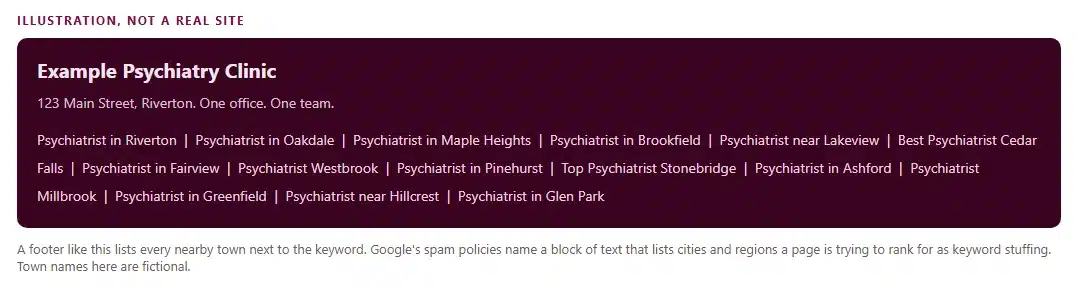
Why does it happen? Because someone heard that local SEO means showing up in nearby towns and took it literally. The agency adds a block of towns to the footer, the page looks busy, and everyone assumes it’s working. It isn’t. Google’s spam policies name this exact pattern: blocks of text that list the cities and regions a page is trying to rank for.
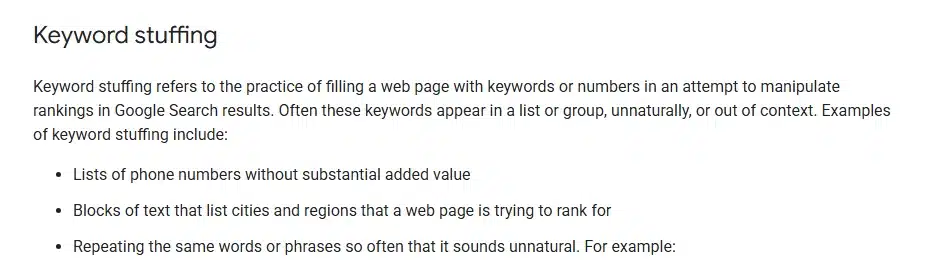
What can this bring? Google’s manual-action documentation lists hidden text and keyword stuffing as a violation. A manual action means human review at Google ended in a penalty, and the site can rank lower or drop out of results. Even with no penalty, a patient who scrolls to that footer sees clutter, and clutter doesn’t build trust.
Here’s how we fix it. First, we read your pages the way Google does, through the page source or the URL Inspection tool in Search Console, because stuffed text sometimes hides in a style that blends into the background. Second, we delete the town blocks. Third, if you have more than one office, each office gets its own page with its own address, doctors and hours, and the towns it serves appear in a sentence the way a patient would say them. A one-office practice needs one location page, not fifteen town pages. If Search Console already shows a manual action, we fix every affected page and then request a review. Fixing only some pages restores nothing. Our local SEO guide shows how a location page earns its place.
2. Ranking for Searches That Can’t Bring Patients
Ranking for searches that can’t bring patients means your pages sit on page one for terms nobody types when they’re ready to book. The report looks wonderful: rankings up, traffic up. The phone stays quiet.
Why does it happen? Keywords get picked by search volume or by how easy they are to win, not by what the searcher does next. Say a Spravato clinic ranks first for “what is esketamine.” Plenty of people search it. They want a definition, not an appointment, and a page that wins that search can book nobody.
Let’s sort what people type into four buckets, because that’s the fastest way to see the problem:
- Book: a service and a place, like “psychiatrist near me” or “TMS therapy Dallas.” These patients are ready.
- Compare: cost, insurance, or one treatment against another. They’re close to deciding.
- Learn: what a condition or treatment is. They build trust and feed later searches.
- Off-target: job seekers, other states, other specialties. They’ll never book.
Search Console’s query report lists what people typed before they clicked your pages. Sort that list into the four buckets and set it beside your call and form log. If most clicks land in Learn and Off-target while the appointment requests come from Book, your rankings are measuring the wrong thing.
What can this bring? Content budget spent on visitors who’ll never book, and ad money too if you run Google Ads, because every off-target click costs the going rate. In LocaliQ’s benchmark data that’s $3.63 for hospitals and clinics, $5.42 for chiropractic and $6.42 for general dentistry.
The fix is to build one page for each service and place, aim it at the Book and Compare phrases, and keep Learn articles as supporting pages that link to it. Then you judge each page by appointment requests, not by rank. Our SEO versus Google Ads comparison shows how paid search mirrors the same four buckets.
3. Spam Backlinks
A backlink is a link from another website to yours, and spam backlinks are the ones that someone bought or built in bulk to manipulate rankings instead of earning them. Google defines link spam as creating links to or from a site primarily to manipulate search rankings.
Why does it happen? Two ways, and both start with a promise. An agency says it will build “authority links” and delivers guest posts on unrelated blogs about casinos, loans and sneakers. Or a former vendor submitted the site to low-quality directories in bulk years ago, and the links stayed. Neither one feels like a problem when it happens. You only see it later, in a link report.
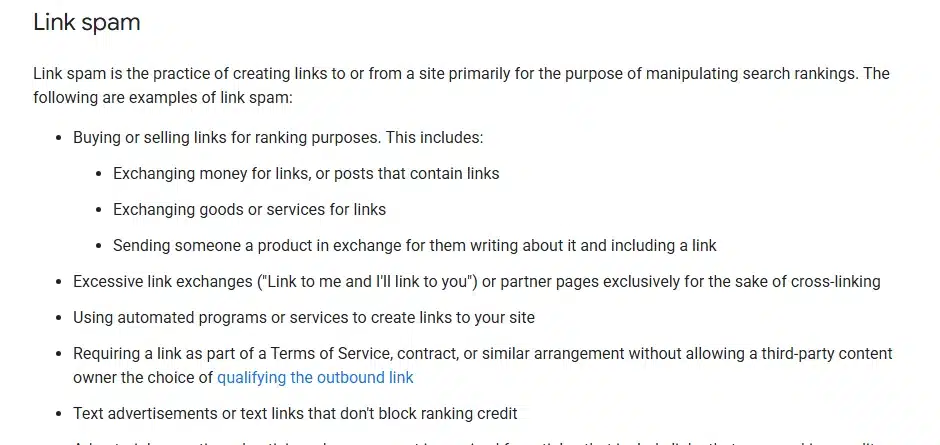
What can this bring? An unnatural-links manual action, where some or all of the site ranks lower. Paid links break no rule when they carry a rel="nofollow" or rel="sponsored" attribute, so the issue is paid links that pass ranking credit.
Here’s how a cleanup runs, in the order Google documents it. You export your links from Search Console and look for patterns: unrelated topics, foreign-language blogs, hundreds of links with the same anchor text. We ask the owners of those sites to remove the links. Whatever stays gets disavowed. Then you request a review with documentation of what you removed. Google asks for a good-faith removal attempt first, and disavowing everything doesn’t count as one. The page I read lists no fixed review time, so plan on waiting. Going forward, any agency selling “links” gets asked where each link lives and whether it carries a sponsored attribute. Our medical SEO services page explains how we approach link work.
4. Schema That Doesn’t Match the Page
Schema is a block of code on your page that tells Google, in a language it reads, who wrote the page, who reviewed it and what the clinic’s phone number is. A schema mismatch is when that code says something the page itself doesn’t show.
Why does it happen? A plugin builds the markup from settings nobody has opened in years. Someone copies markup from another site. A template adds a “reviewer” field that nobody fills in on the page. Or the page gets edited and the markup doesn’t. The page looks fine to you because you never see the code.
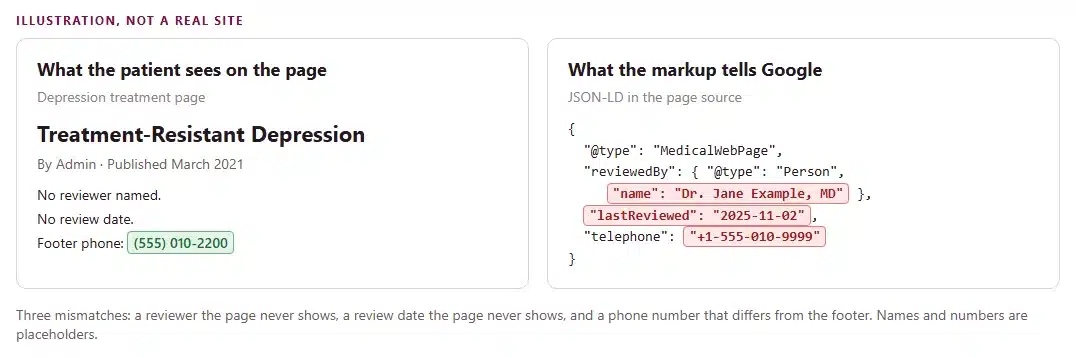
What can this bring? Google’s structured data guidelines say markup must be a true representation of the page, can’t describe content readers can’t see, and can’t cover only some of the visible items. A violation can bring a manual action. Here’s the part people get wrong: Google says that action removes the page’s eligibility for rich results and doesn’t affect how the page ranks in web search. So you lose the extras, and you’ve also told Google something your page can’t back up.
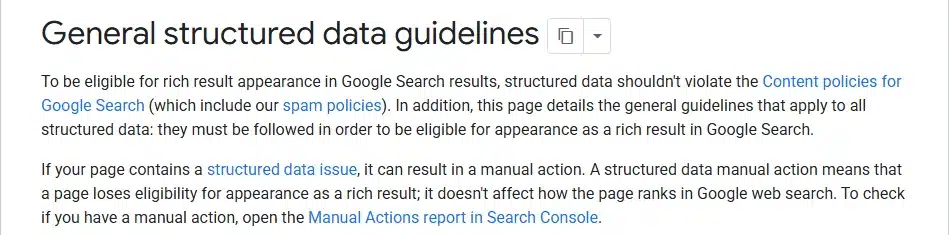
The fix starts with a side-by-side. You run the page through Google’s Rich Results Test and read the markup against what a patient sees. Every name, phone number, address, date and review in the markup has to appear on the page. Anything that doesn’t gets added to the page or deleted from the markup. If Search Console shows a structured data manual action, you fix the markup and then request a review in the Manual Actions report. Entity markup also feeds AI answers, which our SEO versus GEO post explains.
5. Noindex Tags and robots.txt Blocks
A noindex tag is a line of code that tells Google “don’t list this page.” A robots.txt block tells Google’s crawler “don’t visit.” Either one can hide a service page from patients while the page keeps working perfectly for anyone who has the link.
Why does it happen? A noindex tag can ride along from the staging site, where it belonged, to the live site, where it doesn’t. A plugin setting does it too, and so does a developer’s note that nobody removed at launch. Google’s own documentation notes that platforms such as WordPress, Wix and Blogger can expose this through a search-engine settings page instead of your HTML, which means it’s easy to flip without seeing any code. Picture a relaunch: the new site looks great, the forms work, and a month later the TMS page has vanished from Google. Nothing looked broken, because nothing was.
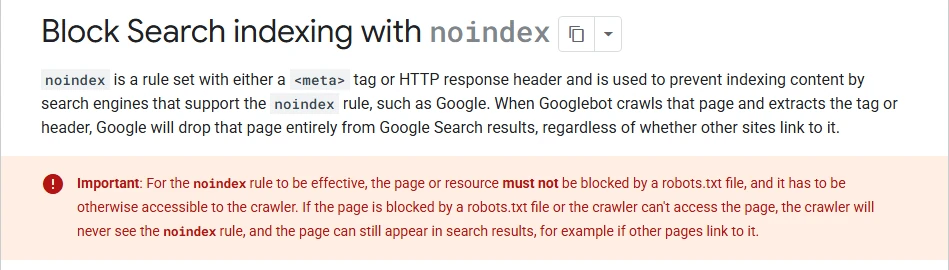
The robots.txt version is stranger. A robots.txt block stops crawling, not indexing, and Google doesn’t support a noindex rule written inside robots.txt. When robots.txt blocks a page that carries noindex, the crawler never reads the tag, so the page can still appear through links. That produces the Search Console status “Indexed, though blocked by robots.txt”: Google knows the URL, can’t read the page, and shows a thin result.
What can this bring? Every patient who would have found that page, every month, for as long as nobody notices.
Here’s how we fix it. Search Console’s Page indexing report lists the statuses “URL marked ‘noindex'” and “Indexed, though blocked by robots.txt.” We open the page in the URL Inspection tool to see what Googlebot saw, remove the noindex tag, unblock the page in robots.txt, and request indexing. The repair takes one line. After it, re-indexing takes days, and regaining the old position takes weeks to months, depending on competition. Our technical SEO guide lists the checks that catch this at launch.
6. Slow or Mobile-Unfriendly Pages
A slow or mobile-unfriendly page is one that loads well on the office computer and badly on a patient’s phone. Google puts numbers on that through Core Web Vitals.
Why does it happen? Big uncompressed photos, sliders, chat widgets, video backgrounds and a plugin for every little feature all pile weight onto a page. On the office desktop with fast internet you never feel it. On a phone in a waiting room, you wait for the page to load, so you leave.
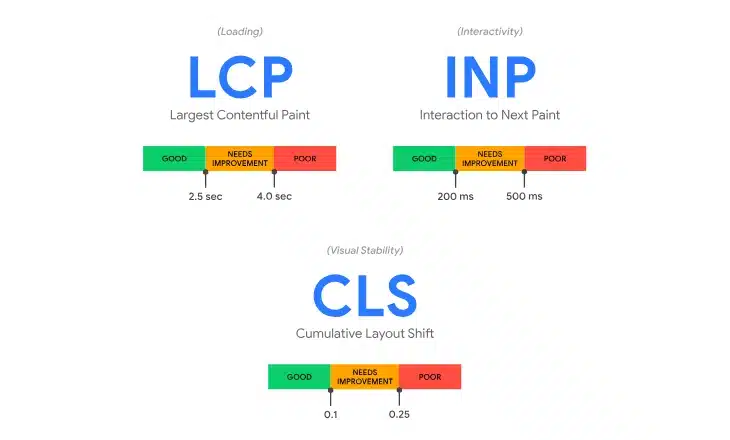
The “good” lines are these: Largest Contentful Paint within 2.5 seconds, Interaction to Next Paint at 200 milliseconds or less, and Cumulative Layout Shift at 0.1 or less. Google measures each at the 75th percentile of page loads and splits mobile from desktop. One load in four can run slower than the line and the page still passes.
What can this bring? Patients who leave before they book. No source in this study turns a slow page into a number of lost patients, and the percentages circulating online come with no stated method, so this guide doesn’t borrow them. You can measure it yourself. In GA4, compare form and call completions on mobile against desktop for the same landing page. If mobile converts far worse, speed is costing you. If both convert alike, speed isn’t your leak and the money belongs elsewhere.
To fix it, we run the page through PageSpeed Insights and read Search Console’s Core Web Vitals report, then compress images, remove the heaviest widgets and test on a real phone over mobile data. A medical website design project treats these lines as a launch gate.
7. NAP Inconsistency
NAP stands for name, address and phone number, and NAP inconsistency means those three details differ for the same clinic across your website, your Business Profile and other listings.
Why does it happen? Clinics move, rebrand, add a doctor or switch phone systems, and the web keeps old copies. A call-tracking number replaces the main line on some listings and not others. “Dr.” appears in one listing and not another. A suite number gets dropped. A data aggregator keeps feeding a directory your address from before the move.
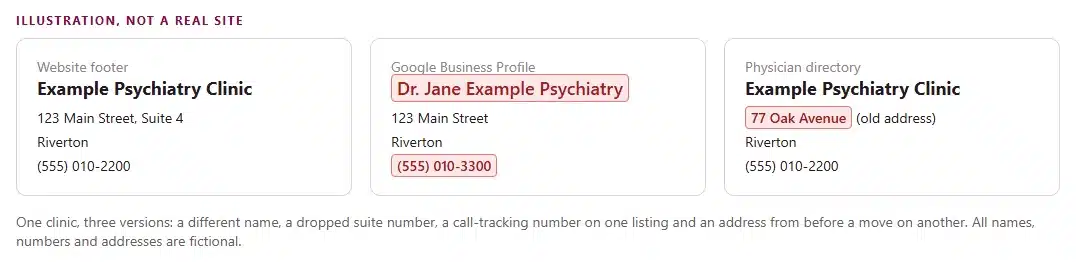
What can this bring? Google states that businesses with complete and accurate information are more likely to show in local results, and that inaccurate information can keep a profile from showing for relevant searches. In Whitespark’s 2026 survey of 47 local search experts, the website’s NAP matching the Business Profile ranks #15 among local pack factors, and consistency across Google, Bing and Apple Maps ranks #28. And there’s the plain human cost: a patient dials an old number and stops trying.
Here’s how we fix it. We pick one canonical format for the name, address and phone and write it down. Then we search the clinic’s name and phone number, list every place a different version appears, and fix the Business Profile first, the website footer and schema second, and the directories third. The Business Profile setup guide covers the profile side.
8. Missing Local Citations
A citation is any listing of your clinic’s name, address and phone number on another website, and a missing citation is a directory or listing site where your practice belongs and doesn’t appear.
Why does it happen? The practice set up a Business Profile years ago and never listed anywhere else. Or a new doctor joined and nobody added them. For a medical practice, “anywhere else” means physician directories, insurer provider directories, hospital affiliation pages and state or specialty society listings. Those are the places a patient or a referring doctor checks before they call.
What can this bring? A doctor missing from these lists loses twice. Patients who start on a directory never meet the practice, and the web carries fewer independent confirmations of who the practice is. Google ties prominence to how many websites link to a business and how many reviews it has. Whitespark’s 2026 report gives a split picture: citations have lost weight in the local pack over a decade, but 3 of the top 5 AI search visibility factors are citation factors. In the same survey, the quantity of structured citations ranks #110 for the local pack, far below NAP matching at #15. So a missing citation costs less on the map than a wrong one does, and more in AI answers.
Here’s how we fix it. We list the directories that matter for your specialty, check each one for an existing listing, claim what’s there, and complete every field using the canonical NAP from mistake 7. The same report advises listing on the prominent directories in your industry, and we start with the ones patients and insurers actually use. Our practice listing management service covers the directory set.
9. Content Published Under “Admin” or an Agency Name
A page published under “Admin” or the agency’s name tells readers, and Google, that nobody clinically accountable stands behind it. I find this on medical websites all the time, and it’s the easiest mistake to fix.
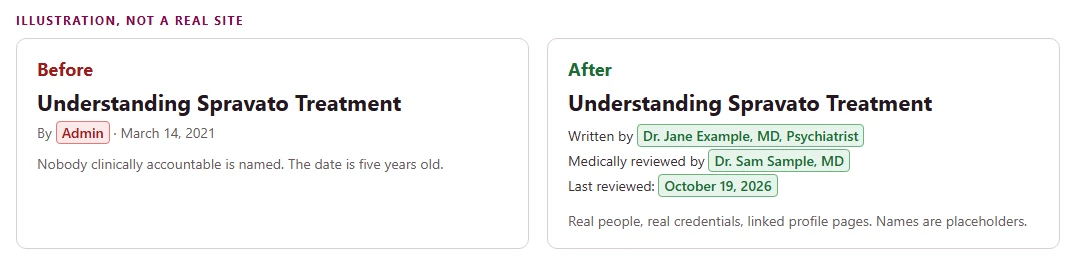
Why does it happen? WordPress assigns “admin” as the default author, and every page published from that login inherits it. Or the agency runs the publishing account and its team gets the credit. The doctor is busy, so nobody asks them to put their name on anything.
What can this bring? Google’s helpful-content guidance asks whether it’s self-evident to visitors who authored the content and whether pages carry a byline where readers expect one, and it strongly encourages accurate authorship information. Google also says trust is the most important part of E-E-A-T, and that E-E-A-T isn’t a ranking factor itself. So the cost shows up in patients who read your page and don’t book, not in a rankings report.
Here’s how we fix it. Each clinical page gets a real author: a physician, or a credentialed medical writer, with a profile page, a real license and a link from the byline. If the doctor doesn’t write, a medical writer drafts and the physician reviews, and both names appear. The fix is never a made-up doctor. Google lists fabricated creator profiles and false credentials as deception. To price this one, compare appointment requests on pages with a named clinician against pages without one, in your own analytics. Our content marketing for doctors page explains how bylines and clinician review fit into publishing.
10. Medical Review That Is Missing or Unlabeled
Here’s a pattern I keep running into: the practice does have a physician check the facts before publishing, but the page shows no reviewer name, no credential and no date. The review happened. Nobody can see it, so it earns nothing.
Why does it happen? The review runs over email or in a document, and the page template has no place for a reviewer. Or the template has one and nobody fills it in.
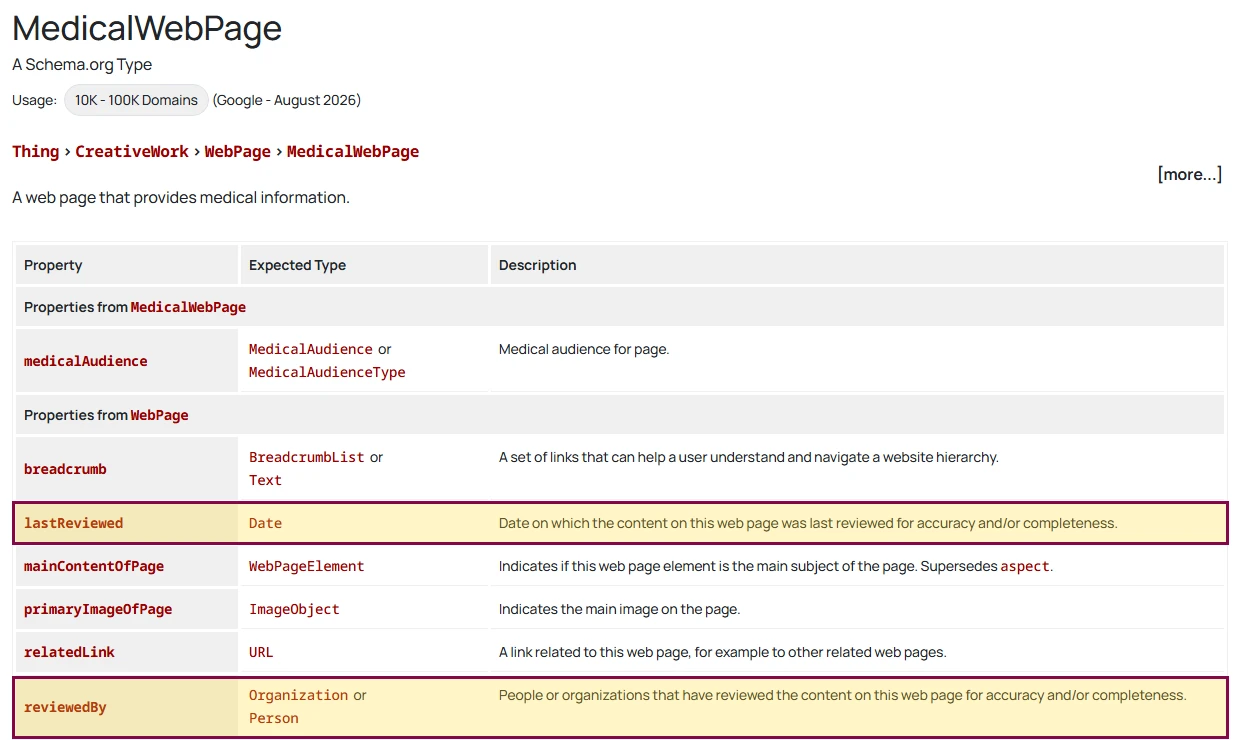
What can this bring? Google’s guidance asks whether the content is written or reviewed by someone who demonstrably knows the topic well. A visible line answers that question. Silence doesn’t. No source shows a ranking boost from a review label, and this guide doesn’t claim one. The cost is review time you paid for and nobody can see, plus the trust gap from mistake 9.
Here’s how we fix it. Under the title, the page shows “Medically reviewed by,” the physician’s name and credential, and the date. Then the markup follows: reviewedBy for the person and lastReviewed for the date, both matching what’s visible, as mistake 4 requires. The label also has to be true. A reviewer name on a page that person never read is the false-credential problem Google calls deception. When the facts on the page change, the reviewer re-checks it and the date moves. The reputation and website post covers how visible trust signals read to patients.
11. Stale Medical Content
Stale medical content is a treatment, device or policy page whose facts changed while the page didn’t. The problem isn’t age. It’s that an old sentence is now wrong.
Why does it happen? Nobody owns the page after it’s published. An FDA status changes, an insurer updates a coverage rule, an ad platform rewrites a policy, and the page keeps saying what it said the day it went live. Google holds health topics to a standard of being highly accurate and consistent with established expert consensus, and its guidance names no age limit for a page. Accuracy is the test.
What can this bring? Wrong clinical information in front of patients, which is a risk for them and for you, and slow erosion of trust in everything else on the site. A second mistake hides inside this one: changing a date to look fresh. Google’s guidance flags changing the date of pages when the content hasn’t substantially changed. Its publication-date documentation asks for a visible date labeled “Published” or “Last updated,” with the structured data date matching the visible one. A practice that bumps the date every quarter without touching the text breaks both rules.
Here’s how we fix it. Every clinical page gets an owner and a re-check date. At each re-check, every regulatory or clinical sentence goes back to its source: the FDA label, the insurer’s policy, the platform’s current text. If a sentence changed, the page changes. Only then does the visible date move, and the markup date moves with it.
What Medical SEO Mistakes Cost a Practice
Here’s the plain-language version. Every mistake in this guide costs a practice in some mix of four ways:
- Patients who never find you, or never book. This is the biggest cost. In Zocdoc’s survey of 351 medical groups and 11 health systems, a new patient at a smaller medical group was worth about $538 in their first year, and about $1,395 at a health system. The survey doesn’t state a year. Your own number will differ, so your own books replace it.
- Ad money that goes nowhere. If you run Google Ads, each click that can’t turn into an appointment still costs the going rate. LocaliQ’s benchmark data puts the median click at $3.63 for hospitals and clinics, $5.42 for chiropractic and $6.42 for general dentistry. Money paid for bad links belongs here too.
- Trouble with Google. A manual action can push pages down or out of results, and a schema problem can cost you rich results. Google lists no price or fixed timeline for any of it, so it doesn’t fit a formula. It arrives as a lump.
- Time. After the fix comes the wait. Indexing takes days, ranking movement takes weeks to months depending on competition, and a manual action adds a review wait with no fixed length.
Here’s how to put a number on your own practice:
- Missed patients: the appointment requests a page brought in before the mistake started, read from your call and form log
- Value of each one: what a new patient is worth to your practice in the first year
- Wasted clicks: the clicks your ads paid for that landed on a page that couldn’t book, read from the Google Ads search terms report, multiplied by your cost per click
- Months: how long the mistake ran, from the day it started to the day the fix is confirmed
Missed patients times their value, plus the wasted click cost, times the months, gives the monthly leak your practice carries. Trouble with Google sits outside that sum. Our patient lifetime value guide walks through calculating a new patient’s value from your own books.
And here’s what each mistake costs, in plain words:
- Keyword stuffing in local pages: the risk of Google ranking you lower or dropping pages, plus weeks of waiting after a review request
- Ranking for searches that can’t bring patients: content and ad money spent on visitors who’ll never book, and the Book searches you didn’t win
- Spam backlinks: what you paid for the links, the risk of a manual action, and a long cleanup
- Schema that doesn’t match the page: lost rich results, with web ranking unchanged according to Google, and a page that tells Google one thing and patients another
- Noindex tags and robots.txt blocks: every patient that page would have brought in, every month, until someone finds the tag
- Slow or mobile-unfriendly pages: patients who leave before they book, priced by comparing mobile and desktop completions
- NAP inconsistency: fewer map pack appearances and calls to numbers that no longer work
- Missing local citations: patients who start on a directory and never meet you, and a weaker presence in AI answers
- Content under “Admin” or an agency name: patients who read, don’t trust and don’t book, priced by comparing pages with and without a named clinician
- Medical review that is missing or unlabeled: review time you paid for that nobody can see, plus the same trust gap
- Stale medical content: wrong clinical information in front of patients and a slow loss of trust
How to Find These Mistakes in Your Own Accounts
Five views show which mistakes a practice is making, and you can read all of them without a developer: Search Console, the Business Profile dashboard, the call and form log, a view of the page source and a manual check of each directory listing.
| What you see | Where | Mistake |
|---|---|---|
| A footer or page listing many towns | A look at the page | Keyword stuffing in local pages |
| Clicks rise while appointment requests stay flat | Search Console query report beside the call and form log | Ranking for searches that can’t bring patients |
| Links from sites you don’t recognize | Search Console, Links report | Spam backlinks |
| Markup names a reviewer, phone or date the page doesn’t show | Rich Results Test beside the live page | Schema mismatch |
| “URL marked ‘noindex'” or “Indexed, though blocked by robots.txt” | Search Console, Page indexing report | Noindex tags and robots.txt blocks |
| Mobile URLs flagged as failing | Search Console, Core Web Vitals report | Slow or mobile-unfriendly pages |
| Different names, suites or numbers across listings | The Business Profile beside each directory | NAP inconsistency |
| No presence on physician or insurer directories | A search for the practice name plus “provider” | Missing local citations |
| “Admin” or the agency’s name in the byline | The page itself | Content under “Admin” or an agency name |
| A clinical page with no reviewer or review date | The page itself | Medical review missing or unlabeled |
| Clinical pages unchanged since a policy or label change | The page against its source | Stale medical content |
A symptom with no match in your accounts points to a tracking gap, which is a mistake in its own right: no one can price a leak they can’t see. Our practice KPI guide lists the numbers to pull each month.
The Order to Fix Medical SEO Mistakes In
A page Google can’t index goes first, then anything that risks a manual action, then local consistency, then the trust content, then targeting and speed. The order follows the cost: a hidden page carries the largest monthly leak and the shortest repair.
Noindex and robots.txt blocks come first because the repair is one line and the loss runs every month. Keyword stuffing, spam backlinks and schema mismatch come second. Each one risks a manual action, and each recovery needs a review request, so the clock starts the day the work does. NAP and citations come third. Authorship, medical review and freshness come fourth: they need a physician’s time and compound slowly. Intent targeting and speed run as ongoing work behind them. A tie goes to the shorter wait.
A practice that works in the reverse order, polishing blog content while a noindex tag sits on its service page, pays the leak every month for work that isn’t the problem.
Frequently Asked Questions
Who should be the author of a medical page?
A physician or a credentialed medical writer with a real profile and a verifiable license. Google encourages accurate bylines where readers expect them and lists false credentials among deceptive author signals. An “Admin” account or an agency name tells readers that nobody clinically accountable stands behind the page.
Does a “medically reviewed” label improve rankings?
No source shows that it does. Google says E-E-A-T isn’t a ranking factor and that trust is its most important part. The label shows patients who checked the facts, and it only counts when the review is real and the markup matches the visible page.
Can wrong schema get a medical site penalized?
Yes, in a limited way. Google states that a structured data issue can bring a manual action that removes rich result eligibility and leaves web ranking unchanged. Fixing or removing the markup and requesting a review in the Manual Actions report starts recovery.
How long does recovery take after a fix?
Indexing takes days. Ranking movement takes weeks to months, depending on competition, and no one can promise a date. Manual actions add the wait for a review, and Google lists no fixed time for it.
What does it cost to fix these mistakes?
Scope decides, and the pricing page shows what shapes an engagement. The $499 Trial Month covers any one core service for one doctor and one location, with no setup fee and no long-term contract, and the trial fee applies toward a monthly plan.
Seeing “Admin” on your clinical pages, a noindex status or mismatched listings? Book a free call and we’ll walk through your accounts together.

Medical & Healthcare SEO Expert focused on turning search visibility into booked patients and revenue. Specialties: technical SEO, schema and LLM visibility, AI SEO/GEO, and local search for clinics.
More from AtiurBook a free 30-minute strategy call and we’ll show you where the biggest opportunities are.